Write it once.
All your AIs remember.
Journal, pages and tasks with a memory any AI reads and writes over MCP. Bots that work around the clock, a Coding Bot that runs several fronts in T3 Code and a call with Kaderno from your Apple Watch. Opens instantly and works offline.
Works withClaudeChatGPTCursorCodexand any AI that speaks MCP.

Everything you write becomes memory.
Write like in a notebook. Every AI you use reads what you wrote and saves what it learned from you, all in one place, with source and time.
One memory for every AI
Claude, ChatGPT, Cursor and Codex save to the same place through kaderno_mcp. In Memory you see who saved what and when.
Folders that are pages
Write [[Lisbon itinerary]] in a page and it becomes a folder with the itinerary inside. No tags, no dragging. Every title is unique, so every link finds the right page.
Private pages
A private page, and everything inside it, is encrypted on your device. AIs and bots never receive its content.
Call Kaderno
A real call, no button to hold. It listens, thinks and answers out loud in the browser, on the Mac, the iPhone and the Apple Watch.
what do I have tomorrow?
At 9, pay the power bill. Then the dentist at 2 PM.
Everything in ⌘K
Commands and settings in one place, like VS Code. Finds pages, Journal, tasks, meetings and saved links by name, text and meaning. A question goes straight to Kaderno.
Saved links with previews
Paste a video, post or article, or share it from the iPhone. Kaderno keeps the preview and writes a summary so you find it later.
Write normally. Press Tab.
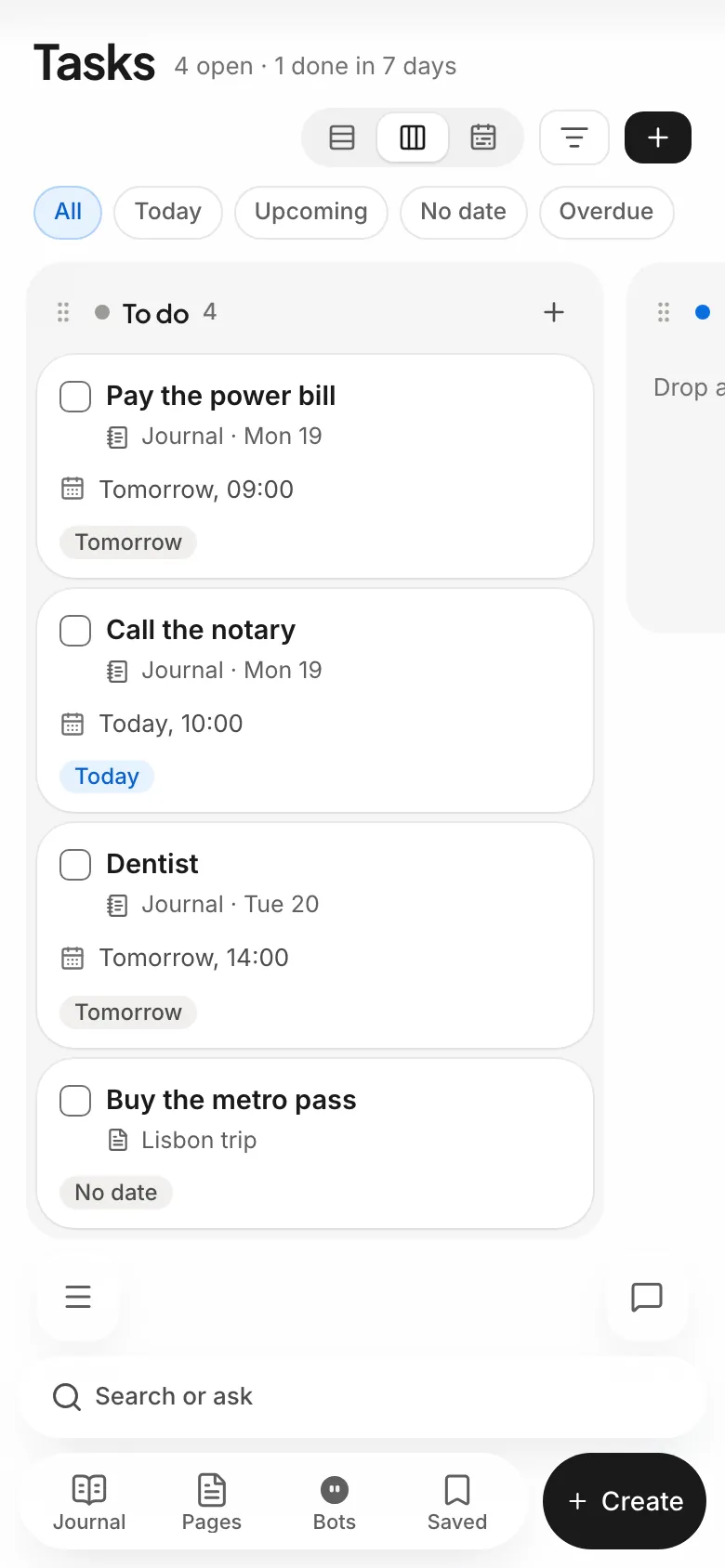
Kaderno reads the date in the sentence and suggests the task. One Tab creates it, with a due date and reminder. It lands on the Tasks calendar, by day, week or month, and in your Google Calendar.
Many coding fronts. One conversation.
The Coding Bot orchestrates your T3 Code sessions. Ask for two tickets in parallel and it opens one front for each, in its own worktree and branch, and shows everything as cards and a graph.
A meeting copilot in your Mac's notch.
When a call starts, the Kaderno Bot asks whether it can record. During the call, a panel shows what is being said, a TLDR every 30 seconds and what your memory knows about the topic. At the end, the summary goes to Meetings and the next steps become tasks in your Journal.
- Live transcript by ElevenLabs, and on the Mac itself when it fails
- Suggestions from your memory, always with the source
- Ask with ⌃⌘↵ without leaving the call
- The panel asks macOS to stay out of captures and folds away when you share your screen
- On the iPhone, it records with the screen locked and shows the meeting in a Live Activity. On a call with the bot, say “record this meeting”
macOS cannot guarantee the panel stays hidden in every call app. And tell the people in the meeting: Kaderno offers a ready notice to copy.
Bots that work while you sleep.
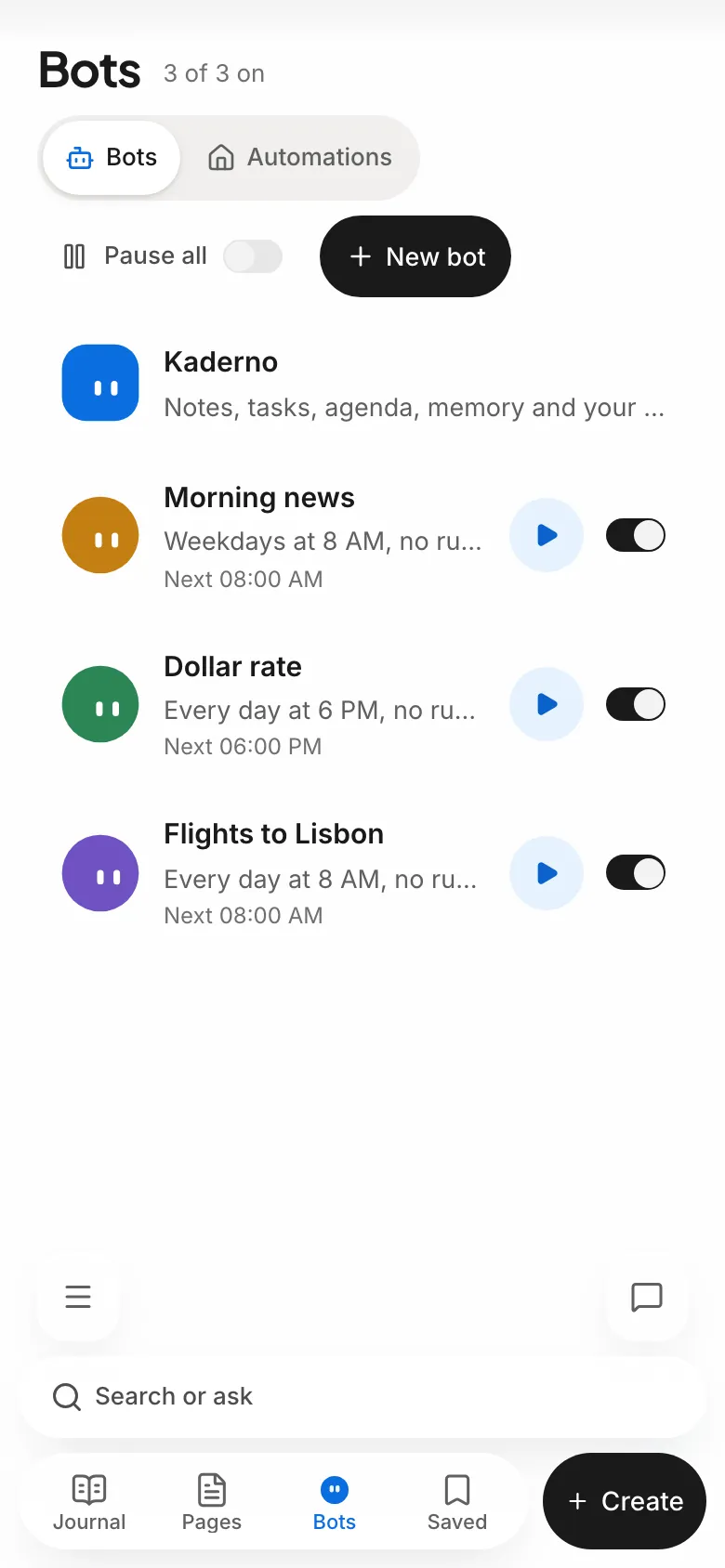
Say in your own words what a bot should do and when. It runs on your accounts through T3 Code or in the Kaderno cloud, around the clock, and writes the result in your notebook.
- You choose where it runs: automatic, only on your computer or always in the cloud
- Automatic models: when one account hits its limit, the conversation moves to the next with its context
- A cloud browser that remembers your logins. You type the password once in Kaderno and the model never sees it
- Each bot has its own email address. Forward a bill and it gets to work
- Reads your Gmail and writes drafts. Sending always waits for youIn testing
- Ask from your watch or the chat and your Mac does it, like sending a message or opening an app
One tap on your wrist and the bot picks up.
On the Apple Watch, every bot has a living face that blinks, listens, thinks and talks to you. Tap Kaderno and ask what is on tomorrow, or tap the Coding Bot to answer what it asked.
- A real call, no button to hold, that works without your iPhone nearby
- Each bot’s state under its face: working, done or waiting for you
- Questions about the time, weather and scores answer fast, and a long task taps your wrist when it ends
- “How long to work?” answers with Apple Maps traffic, and “remind me to buy bread when I get home” becomes a place reminder
- The home grid and Siri turn the lights on and off
Your body and your home in the same notebook.
Health reads Apple Health on your iPhone and writes your day in one sentence. Automations run lights, air conditioning and TV on your home network, from the app, the chat, your voice and the watch.
Health
Sleep, workouts, steps and heart compared with your own normal over the last 28 days. AIs read your health only if you turn it on.
Automations
A small bridge on a computer at home connects your account without opening a port on your network. Locks and gates ask for confirmation in the app.
Your memory inside the AI you already use.
One click installs Kaderno in Claude Code, Codex, Cursor and OpenCode, and the app shows Already added where it is set up. Claude and ChatGPT connect with OAuth. From then on, they read what you wrote and save what they learned from you.
- Searches and reads pages, tasks, links, meetings and bots
- Writes and organizes like you would on screen, and shows tasks and your day as interface in apps that support MCP Apps
- They act directly, without asking at every step. Deleting and paying always wait for you
- In Memory, you see what each AI saved and when
Alfama on the first day and Sintra by train.1 You still need to buy the metro pass.2
Answers that become interface.
Rather stay here? Kaderno's chat uses the same memory and answers with more than text. The Coding Bot shows its plan, files and tests while it works, then sums it all up in one line.
- HTML previews, images and the apps of the MCPs you connected, right in the conversation
- When it creates a task or writes in a page, it shows a card with what changed
- Runs on your own account through T3, or free on Kaderno AI, an open model in the cloud
- Call Kaderno from your computer, phone and watch
The same notebook everywhere.
Write on the Mac, check on your phone, talk on your watch. Everything syncs with your account, and what you write offline uploads when the connection returns.
Mac
In testingA native app that opens a local notebook at once, no account needed. When you sign in, it merges everything into your account. A short welcome connects your AIs, your browser and the permissions.
- Meeting copilot in the notch
- Talk to the bot from the notch
- Save the open link with ⌃⌥S
- Coding Bot fronts and questions in the notch
- The home bridge in one click
- ⌘K on any screen
Web
AvailableWindows, Linux or any browser. Opens instantly and works offline after the first visit.
iPhone and Android
iPhone beta on TestFlightGet the iPhone and iPad app through TestFlight, Apple’s testing app. It has widgets, a Live Activity for meetings and bots, Shortcuts to talk to a bot, Health from Apple Health, meeting recording in the background, place reminders, the same ⌘K palette and the Tasks calendar. On Android, use it in the browser.

Apple Watch
Beta on TestFlightOne tap starts a call with Kaderno and your bots, without taking your phone out. It comes with the iPhone app, has a complication per bot and works without the phone nearby.
Save what you are looking at
In testing on the MacOn the Mac, the Kaderno Bot in the notch notices the post, video or article under the pointer. Click Save or press ⌃⌥S and it keeps exactly that link. On the iPhone, tap Share and Save to Kaderno without leaving the app you are in. The same link becomes one item, with its summary in Saved.
Truly yours.
Your notes stay in your account, with their own storage on the server. Attachments, audio and access keys are encrypted with a key that is yours alone. What is only for you goes in a private folder.
- Private pages
- The page is encrypted on your device before it leaves and opens with your passkey or recovery phrase.
- Local first
- Your changes save on this device and sync with your account when connected.
- Health only with your permission
- The iPhone only reads Apple Health, never writes to it. AIs read your health only after you turn the option on, and nothing goes to ads.
- You confirm before deleting
- Deleted pages stay in Trash for 7 days, with Undo right away. Deleting forever and deletion requests from an AI ask for your confirmation.
- Export anytime
- Download your pages and journals as Markdown files in Settings.
Free. All of it.
Kaderno is free. Everything on this page is included, no credit card.
Create my account- Journal, pages and folders
- Private pages
- Tasks calendar and Google Calendar
- Memory and MCP for any AI
- Kaderno AI in the chat and the bots
- Bots around the clock with a cloud browser
- Coding Bot with parallel fronts
- ⌘K and voice calls
- Meeting copilot on the Mac and recording on the iPhone
- Health and Automations
- Saved links and published pages
- Apps for Mac, iPhone and Apple Watch
The chat and bots on Kaderno’s model have a fair use daily limit. On your account through T3, your plan’s limits apply.
Frequently asked questions.
Didn’t find it? Ask in the app’s own chat.
Do I have to use your chat?
No. You can use just your Claude, ChatGPT, Cursor or Codex over MCP. Kaderno’s chat is optional.
Do bots need T3 Code?
No. With T3 Code connected, they run on your Claude, Codex, Grok or OpenCode accounts and move to the next one when one hits its limit. Without it, or with the computer off, the Kaderno cloud answers.
Does the bot see my passwords?
No. You type the login once in Kaderno’s own form. It is encrypted with a key that is yours alone and goes straight to the cloud browser, only on the right site. The model only gets a nickname.
Do Automations open a port on my network?
No. The home bridge runs on an always on computer and opens an outgoing connection to your account. Only the devices you allow reach an AI, and locks and gates ask for confirmation in the app.
Does it work offline?
Pages you already opened stay available on this device. Changes are saved locally and sync when the connection returns. AI, bots, meetings and integrations need the internet.
Can AIs delete my notes?
They write and organize directly, without asking at every step. Deleting a note, forgetting a memory or paying for something always waits for your confirmation inside Kaderno.
Does the meeting panel show when I share my screen?
The panel asks macOS to stay out of captures and folds away when the call app shows you are sharing. macOS cannot guarantee this in every app, so check before an important presentation.
Can I export my notes?
Yes. In Settings, download your pages and journals as Markdown files.
Do I need an account?
In the browser, yes. In the Mac app, no: it opens a local notebook at once and merges everything into your account when you sign in.
Do I need to install anything?
No. Use it in the browser, on any computer or phone. The Mac, iPhone and Apple Watch apps are optional.
Open the notebook.
It takes a minute. The first page already has today’s date.